
The complete guide to Search Pads in Dedupely
Search Pads are where you define what a duplicate is in Dedupely.




Search Pads are the logic behind every duplicate scan you run in Dedupely, based on the fields, match options, and filters you’ve configured. That means your results, whether spot-on or completely off, are a direct result of how your Search Pad is built.
This guide will help you:
- Understand how Search Pads work
- Set up match options that reflect how you see duplicates
- Add filters that target the right duplicates
- Test, adjust, and merge the right records
What is a Search Pad?
A Search Pad is a saved set of match options where you determine what a duplicate is. You decide:
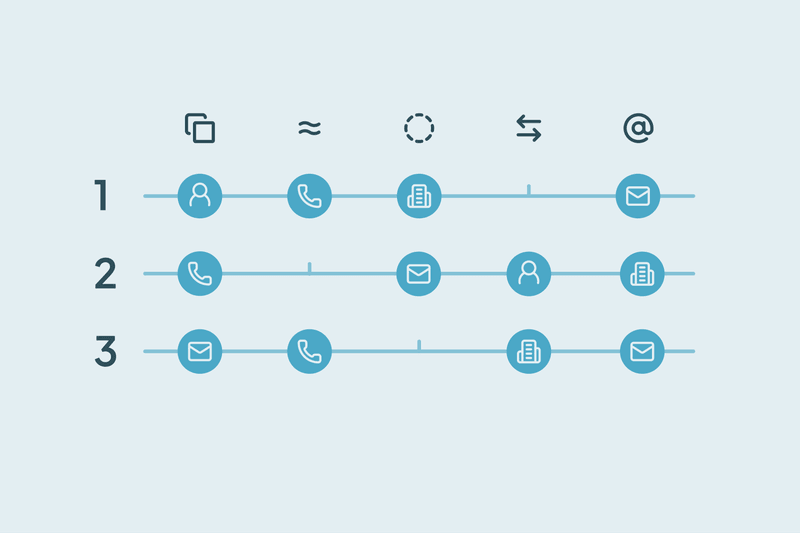
- Which fields to compare (e.g. email, phone, company name)
- How thorough or lenient each match should be
- Whether to apply filters to narrow your searches
Each Search Pad runs with its own logic and you can scan, edit, or clone it at any time to test different match options, without affecting the original Search Pad.
Fields and match options
Fields are the data points Dedupely pulls from your CRM, such as email addresses or first names.
Match options define how those fields are compared:
- Exact: Must be identical
- Similar: Small differences allowed (like typos or punctuation)
- Fuzzy: Finds one or two letters off with a phonetic algorithm built-in
- Similar Words (Any Order): Useful for swapped word order (like “John Smith” vs. “Smith John”)
- First word: Matches based on how many first words you'd like to match
- Last word: Matches on how many last words you'd like to match
- Domain Root: For comparing email domains (e.g. @company.com)
The combination of what you match and how you match it will completely change the results you get:
- Thorough match options narrow your results
- Lenient options expand them
How to think about matching
Matching is about reverse engineering what makes records count as duplicates, for your use case.
Some examples:
- Email + Name using Exact match = high confidence duplicates
- First Name, Last Name, and Phone using Similar match + Company using Similar Words match = good for call center data or lead lists
- First Name using Fuzzy match + Address using Exact match = great for postal data
You don’t need to include every field, just the ones that help match records meaningfully. The goal is to find all your duplicates, not just the obvious ones.
Tip: Start with merging the obvious duplicates, then move into lenient options.
Filters: Narrowing the scan
You can filter the fields Dedupely scans by narrowing your Search Pad.
Here are some examples of what you can do:
- Include only records created after a certain date
- Scan records owned by a specific rep
- Filter by blank values, like duplicates with missing email addresses
- Target one lifecycle stage at a time (like leads vs. customers)
Filters are optional, but they give you control without requiring additional match logic.
Advanced ways to use Search Pads
Search Pads can be tailored to exactly what you need:
- Use granular match options on multiple values to fine-tune logic
- Combine multiple values with different strictness levels (e.g. Email Exact + Phone Similar)
- Add filters to zoom in on one team’s records, or a specific data set
- Separate Search Pads for leads, contacts, accounts, or legacy records
How different teams might use Search Pads:
- Sales might care most about Email + Name + Deals associated
- Customer Success might match based on Company + Domain Root
- Ops might need to fix Address + Phone across the CRM
Search Pad tips (save this part)
- Start small. One field with a strict match is a significant first step.
- Don’t try to match everything in one pad, it’ll dilute results.
- Use three to four match options.
- Clone your Search Pads to test new logic safely.
- Don't match single fields. That could cause false positives.
- Always preview before merging. If something does not look like an obvious duplicate, fix the logic.
Search Pads are the starting point in Dedupely, they give you more clarity, more control, and better merge results. When you define what a duplicate means to you, Dedupely does the rest.
Contact us
We’d be happy to help you get this set up.
Write us a message
We probably know the answer to your question already
Book a Zoom
Whether you’re getting started or getting intense.
Get in touch!
Discover Related Blog Posts
Stay updated with our latest articles and insights.

Get started for free
20 free trial merges and as much free support as you need to get your duplicates under control.

 Or sign up with Google

H Chitty
HubSpot User
 HubSpot Marketplace
Alina T
Sales Operations Specialist, FieldBee
R McNaught
HubSpot User
HubSpot Marketplace 
John K
Head of Marketing, David J Anderson School of Management
 Pipedrive user
Samo J
Founder & CSO, TapHome
Pipedrive user 
M Weppner
Yuliya
Pipedrive User
Pipedrive Marketplace D Wright
HubSpot User
HubSpot Marketplace Shawnee K
Salesforce User
 Salesforce AppExchange
 DiBlasio S
HubSpot User
HubSpot Marketplace Laura R
Salesforce User
Salesforce AppExchange Emily K
Mercy Housing
HubSpot user Paweł S
Pipedrive User
Pipedrive Marketplace Grattan H
Pipedrive User
Pipedrive Marketplace 
Scott B
VP Platform Ecosystem, HubSpot
Burchard J
HubSpot User
HubSpot Marketplace 
Sean B
Managing Director, Legal CPD
Isaac J
Salesforce User
Salesforce AppExchange Larry D
Pipedrive User
Pipedrive Marketplace Andy G
Pipedrive User
Pipedrive Marketplace 
Simon W
Tillhub

Allan R
Co-founder & Managing Director, Target3D

Marco S
Information Systems Manager, Efecte

A Team
HubSpot User
HubSpot Marketplace J Eddie
HubSpot User
HubSpot Marketplace A Grogan-Crane
HubSpot User
HubSpot Marketplace Wasmer D
HubSpot User
HubSpot Marketplace 








